What Are Smart Glasses? Types, Uses and Limits Explained
Smart glasses are eyewear with built-in electronics that pair with your phone. They split into audio, camera, display and translation types, each with its own uses and limits.
The Folio & Current Team
October 21, 2026 · 6 min read

What are smart glasses? They are eyewear with small electronics built into the frame, such as speakers, microphones, a camera or a display in the lens, and they pair with a smartphone, for example over Bluetooth. They fall into four main types: audio, camera, display and translation. Which one suits you depends on what you want the frame to do while you wear it.
This guide sorts the types, shows what each does and where each falls short, and ends with a buying checklist to use before you order.
What are smart glasses and how do they work
A pair of smart glasses looks like regular glasses or sunglasses, but the temples and front hold small electronics. Those parts can include microphones, speakers, a battery, touch controls on the temple and sometimes a camera or a display.
The frame often does not work alone. It can pass audio or images to a paired smartphone, and a companion app handles tasks such as translation or settings. That is why the phone connection matters as much as the frame itself.
Because the electronics are powered by a battery, the glasses need charging, usually through a cable. Check what cable and accessories come in the box before you buy.
Smart glasses are not VR headsets. A headset covers your view with a screen, while smart glasses leave you looking at the real world through the lenses.

The four types of smart glasses
Some pairs mix features, so think of these as categories of purpose rather than strict boxes. The table shows what each type is for and what to expect it to lack.
| Type | What it adds | Typical uses | Limits to know |
|---|---|---|---|
| Audio | Speakers and microphones in the temples | Music, calls, voice assistants | No visual output; sound can leak around others |
| Camera | A small camera in the frame | Hands-free photos and video | Privacy concerns for bystanders; rules vary by venue |
| Display | Text or graphics shown in the lens | Notifications, navigation cues, subtitles | Small viewing area; extra weight and electronics |
| Translation | Microphones plus a translation app | Conversations across languages | Needs a paired phone and the app; accuracy varies by speech and noise |
Audio glasses
Audio glasses use open-ear speakers that sit near your ears instead of inside them. You hear calls or music while the sounds around you stay audible, which suits walking and commuting.
Camera glasses
Camera glasses record from roughly your point of view. Our guide to camera in glasses explains how the capture works and what to expect from it.
Before you choose one, check whether the frame has a visible recording indicator and how photos and video are transferred to your phone.
Translation glasses: audio and display approaches
Translation is where the audio and display types meet. The frame captures speech, sends it to a paired phone, and the result comes back either as spoken audio or as text in the lens.
Both routes depend on the companion app, so check which language pairs it supports before you choose a frame.
Spoken translation through open-ear speakers
VoxBridge takes the audio route. It pairs with a smartphone over Bluetooth 5.4 and sends audio to a companion app that supports 75 languages. Translated speech plays through open-ear speakers, so the voice of the person talking stays audible.
The frames weigh 135 grams (about 4.8 ounces), have lenses that tint automatically from indoor to bright light, and use touch controls on the temple for calls, music and starting a translation.
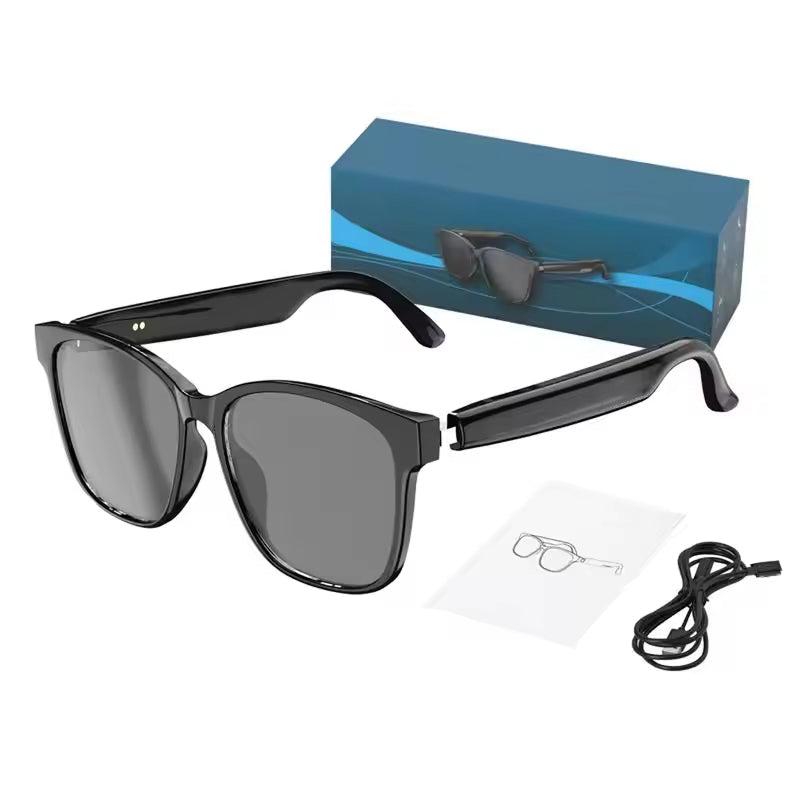 In this guideVoxBridge$139.99View
Translated text shown in the lens
LinguaLens takes the display route. Translated speech appears as a MicroLED text overlay in the lens, within your field of view, so you can read it as a subtitle while you look at the speaker.
It uses four directional microphones with noise reduction, meant for settings such as restaurants or meeting rooms where several people talk. It connects to a smartphone over Bluetooth 5.4, charges through the included USB cable, and combines headphone, reading and sun lens roles in one 135 g (about 4.8 oz) frame.
 In this guideLinguaLens$129.99View
AR smart glasses versus display glasses
The term AR smart glasses describes frames that place digital content over what you see. In practice, some products sold under that label show only simple text or small graphics, not full three-dimensional scenes.
When you compare display glasses, look at what is shown, where it appears in your field of view, and whether the content comes from a phone app. A text overlay for subtitles is a narrower job than full augmented reality, and the frame should match the job you have in mind.

Everyday uses at a glance
What are smart glasses for in daily life? Match the frame to a routine you already have. A commute calls for audio, a trip abroad calls for translation, and a hands-free clip of a walk calls for a camera.
- Calls and music while you walk, with the surroundings still audible.
- Hands-free photos and video from your point of view.
- Subtitles or short notifications shown in the lens.
- Conversations across languages at a table or in a meeting.
- Sun lenses that tint on their own when you step outdoors, on frames that include them.
Disadvantages and limits of smart glasses
Smart glasses have trade-offs, and it helps to weigh them before you buy.
- They add electronics to the frame, so weight and fit matter. Check the stated weight and try the frame on your face shape.
- They need charging, and features can depend on a paired phone and an app.
- Cameras and microphones raise privacy concerns for people near you. This Smart Glasses and Privacy Risks article is a useful starting point, and you should always check the rules of the place you are in.
- Display areas are small, so they suit short text, not long reading.
- Translation depends on clear speech, background noise and the language pair, so expect occasional mistakes.
For background on how smart glasses relate to virtual reality, see the Stanford Report.
Field note
Before you commit to any pair, list the two or three situations where you would wear it. If a feature does not appear in that list, you can skip it.
Can you get smart glasses with your own vision correction?
Some frames accept corrective lenses, and others do not. The answer depends on the frame design and on whether the maker or an optician offers a lens fitting for it.
If you wear glasses daily, confirm this before you order, and ask what happens to the electronics if the lenses are replaced. The product details for VoxBridge and LinguaLens do not cover custom lens fitting, so check the manual and ask the seller.
For standard prescription eyewear, an optician or eye care provider is the place to go. We sell smart frames, which you can browse in the collection linked below.
How to choose: a checklist
Once you know what smart glasses are and which type fits your routine, work through these steps before you order.
| Step | What to check |
|---|---|
| 1. Define the job | Music and calls, photos, notifications or translation |
| 2. Check the phone link | Bluetooth version and whether a companion app is required |
| 3. Read the specs | Weight, microphones, speakers or display type |
| 4. Confirm the lenses | Clear, tinted or custom vision-correction options |
| 5. Look at charging | Cable type and what is in the box |
| 6. Think about privacy | Cameras and microphones in shared spaces |
If you want to compare more frames, browse our Smart Glasses & Heads-Up Displays collection. If you mainly want audio and are weighing it against headphones, see how to choose wireless over-ear noise canceling headphones.
Common mistakes when buying smart glasses
- Choosing on a long feature list instead of the few tasks you will use.
- Skipping the language list on a translation model.
- Ignoring weight and fit, which decide how long you can wear them.
- Forgetting that a camera or microphone changes how others around you feel.
- Assuming your lens needs will be met without asking.
Pair the glasses with your phone at home first, open the app, and run through each temple control before you take them out. Follow the manual for charging and care.