Surge Protector vs Power Strip: How to Tell Them Apart and Choose
A surge protector diverts voltage spikes and a basic power strip only adds outlets. Here is how to read the label, what to plug into each, and when to replace one.
The Folio & Current Team
November 19, 2026 · 7 min read

A surge protector vs power strip comes down to one feature: a surge protector contains parts that divert extra voltage away from your devices, while a basic power strip only adds outlets. Both plug into one wall outlet, and both can look almost identical. Check the label for a joule rating and a clamping voltage, because a plain power strip has neither.
This guide shows how to tell them apart, how to read the numbers, what to plug into each, and when to replace a surge protector.
What a power surge is and what a surge protector does
A power surge is a short jump in voltage above the normal level on a circuit. It can come from lightning, utility switching, or a large appliance cycling on and off inside your home. Electronics with sensitive circuits, such as computers, monitors and gaming consoles, are the devices most worth shielding.
So, what does a surge protector do? It contains a component, commonly a metal oxide varistor, that reacts to excess voltage and diverts the extra energy so less of it reaches the devices plugged in. A surge protector power strip combines that component with several outlets in one housing.
It does not create power, store power, or keep devices running during an outage. Its job covers voltage spikes only.
Surge protector vs power strip: side-by-side table
Is a power strip a surge protector? Not by default. Some strips are sold as plain outlet expanders, and the two names get used loosely in stores. This table sets out the differences you can check on the box or label.
| Feature | Basic power strip | Surge protector strip |
|---|---|---|
| Main purpose | Adds outlets | Adds outlets and diverts voltage spikes |
| Joule rating | None listed | Printed on the box or label |
| Clamping voltage | None listed | Printed on the box or label |
| Indicator lights | Often a power light, or none | A protection light, sometimes a grounding light |
| Internal parts | Wiring and a switch or breaker | Wiring plus surge-diverting components |
| Wears out | Through physical damage | Through physical damage and by absorbing surges |
| Good for | Lamps, chargers, low-cost items | Computers, monitors, TVs, consoles, audio gear |
If the packaging says nothing about surge protection, joules or clamping voltage, assume it is a plain power strip.

How to read joules, clamping voltage and indicator lights
Joule rating
The joule rating describes how much surge energy the device can absorb over its working life. A higher number means more absorbing capacity, which matters for expensive electronics. Compare joule ratings only between surge protectors, since a plain strip lists none.
Clamping voltage
Clamping voltage is the level at which the device starts diverting excess voltage. A lower clamping voltage means it reacts at a lower threshold, so check this number alongside the joules rather than relying on one figure.
Indicator lights
Look for a light that confirms the surge-diverting parts are still working. If that light goes out or changes color as the manual describes, the surge-diverting parts have been used up and the unit should be replaced even though the outlets may still deliver power. A grounding light, where present, tells you the wall outlet is wired with a ground connection.
Other label details
- The total wattage or amperage the strip allows, which must cover everything plugged in.
- A listing mark from an independent laboratory on the housing or box.
- Cord length and outlet spacing, so bulky plugs do not block neighbors.
A surge protector power strip for a desk setup
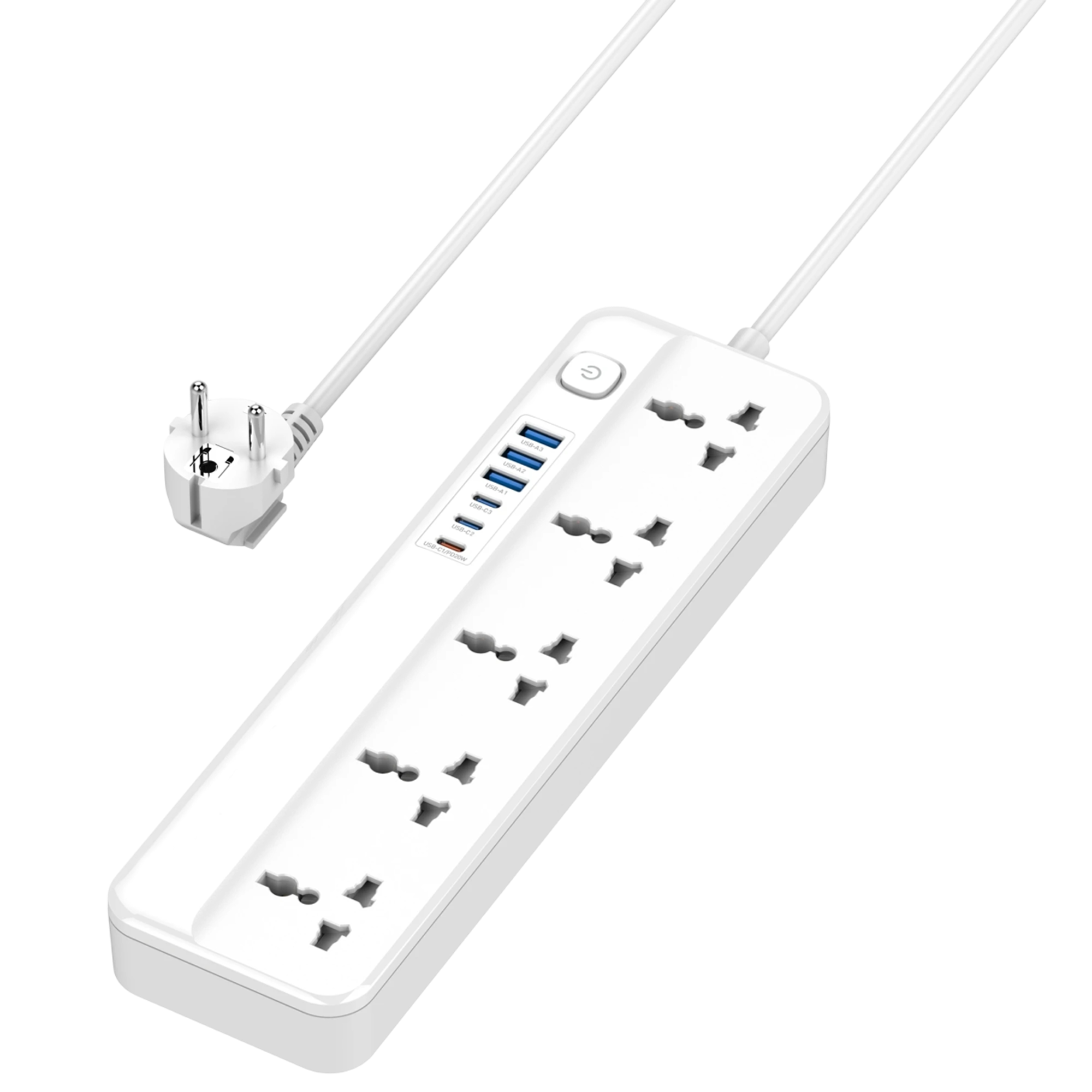
A desk with a laptop, monitor and several chargers is a common place for a surge protector power strip. JouleDeck is one example: it has five AC outlets and six USB ports, with a USB-C PD port at 20W for phones that use Power Delivery. It also includes surge protection, child-safe shutters, reinforced copper wiring and a flame-resistant housing.
One master switch cuts power to every outlet and port, so you can shut down the whole desk with one press. The box includes the JouleDeck Power Hub, a 2M Heavy-Duty AC Cable and a User Guide. Check the product page for the full specifications before you buy.
 In this guideJouleDeck$99.99View
What to plug into each: a checklist
Plug into a surge protector
- Desktop computers, laptops and monitors
- TVs, soundbars, streaming boxes and gaming consoles
- Home theater and audio equipment
- Network gear, such as a router and modem
- External drives and docks; see our guide on backing up external hard drives for keeping a second copy of your files
A plain power strip is enough for
- Lamps and desk fans
- Phone chargers and other low-wattage accessories
- Holiday lights, if the strip's label allows it
Do not plug into either one
- Space heaters
- Microwaves, toasters and other heating appliances
- Refrigerators and freezers
- Another power strip or surge protector (daisy-chaining)
- Any appliance whose manual says to use a wall outlet directly
Heating appliances draw a lot of current, and a strip is built for a smaller load. Add up the wattage of everything on the strip and compare it with the total on the label. If you are unsure about a circuit, ask an electrician.
Field note
Plug the surge protector directly into a wall outlet, not into an extension cord or another strip. Then label the date you installed it on the underside so you can judge its age later.
Surge protector vs extension cord, circuit breaker and outages
An extension cord moves an outlet to another spot and nothing more. A power strip adds several outlets. A surge protector adds outlets and the voltage-diverting parts.
| Item | What it does | Handles voltage spikes? | Keeps devices on during an outage? |
|---|---|---|---|
| Extension cord | Extends reach | No | No |
| Power strip | Adds outlets | No | No |
| Surge protector | Adds outlets, diverts spikes | Yes, within its rating | No |
| Circuit breaker | Opens the circuit on overload | It responds to overcurrent, not brief voltage spikes | No |
| Battery backup unit | Supplies stored power when the outlet loses power | Some include spike diversion | Yes, while its stored power lasts |
A breaker reacts to too much current. A surge protector reacts to too much voltage. They do different jobs, so one does not replace the other.
Types of surge protection devices
Whole-home devices are installed at the electrical panel by an electrician. Plug-in surge protectors, including strips, wall-outlet models and cord-style units, sit at the point of use. Some homes use both: a panel device for the building and a strip at the electronics.
How long surge protectors last and when to replace them
There is no single lifespan, because each surge uses up part of the absorbing capacity. A unit in a home with frequent storms or utility switching wears down sooner than one that rarely sees a spike. Check the manual for the manufacturer's guidance.
Replace your surge protector when:
- The protection indicator light is off or shows the status the manual calls a fault.
- It has taken a large surge, such as a nearby lightning strike, even if it looks fine.
- The housing, cord or plug is cracked, discolored or warm during normal use.
- Plugs fit loosely in the outlets.
- You do not know its age and it has no working indicator.
Unplug it before inspecting it. A warm outlet or a burning smell is a reason to stop using it and call an electrician.
Setup checklist and common mistakes
- Add up the wattage of the devices and compare it with the strip's limit.
- Plug the strip into a wall outlet that has a ground connection.
- Keep the cord uncoiled and away from rugs, heat and tight bends.
- Leave space around the strip so air can move.
- Check the indicator light when you start your day.
Common mistakes are using a plain strip for a computer, chaining strips together, and keeping a surge protector long after its indicator has gone out. For a desk with several screens, our dual monitor docking station setup guide shows how to plan the cabling. You can also browse chargers, docks and storage for desk accessories.
On power use: a strip does not add to your bill by itself, because the devices plugged in draw the electricity. An indicator light draws only a small amount.