Ergonomic Gaming Mouse: Match Shape, Grip and Hand Size
Name your grip, measure your hand, then pick the shape that fits both. This guide has three decision tables and a checklist for choosing an ergonomic gaming mouse.
The Folio & Current Team
November 28, 2026 · 6 min read
Choosing a mouse gaming ergonomic setup starts with two facts: how your hand grips the mouse and how long your hand is. Name your grip (palm, claw, fingertip or handshake), measure your hand, then pick a shape from the tables below. Sculpted right-handed and symmetrical bodies stay close to a traditional competitive layout, while vertical bodies suit a handshake grip.
This guide walks through the decision in order, so you can narrow the field before you read any spec sheet.
Which mouse gaming ergonomic shape fits your grip
Your grip type is the first filter. It describes how your hand touches the mouse while you aim, and it decides which body shapes make sense. Rest your hand on the desk the way you play and notice where your palm and fingers land.
| Grip | How your hand sits | Shape to look at | Watch for |
|---|---|---|---|
| Palm | Whole palm rests on the body, fingers lie flat on the buttons | Longer sculpted right-handed body with a thumb rest | A body that is too short leaves your fingers hanging past the buttons |
| Claw | Palm touches the rear, fingers arch over the buttons | Medium body with a raised rear hump | Hump position should line up with your palm |
| Fingertip | Only fingertips touch the mouse, palm stays lifted | Short, low, light body, often symmetrical | Large sculpted bodies are awkward to lift and flick |
| Handshake | Hand stands on its side, as if shaking hands | Vertical body | The aiming motion differs from a flat mouse, so allow practice time |
If you switch grips during a match, choose the grip you use when aiming precisely and shape the decision around that one. A mouse that suits your fine aim matters more than one that suits your casual scrolling.
How to measure your hand for a gaming mouse
Hand size sets the length and width you need. A ruler and a flat desk are enough.
- Place your hand flat on a table, fingers together.
- Measure from the crease at the base of your palm to the tip of your middle finger. This is your hand length.
- Measure across the widest part of your palm, just below the knuckles. This is your hand width.
- Open the product page of any mouse you are considering and compare its listed length and width with your numbers.
- Mark where your thumb and ring finger naturally rest, since side grips and thumb rests need to land there.
The table below gives a general starting point. The ranges are approximate and vary between makers, so treat them as a way to pick a row, then adjust for your grip.
| Hand size | Hand length | Hand width | Palm grip | Claw grip | Fingertip grip |
|---|---|---|---|---|---|
| Small | Under 17 cm (6.7 in) | Under 8 cm (3.1 in) | Compact sculpted body | Compact body, low hump | Small symmetrical body |
| Medium | 17 to 19 cm (6.7 to 7.5 in) | 8 to 9.5 cm (3.1 to 3.7 in) | Mid-length sculpted body | Mid-length body, rear hump | Low symmetrical body |
| Large | Over 19 cm (7.5 in) | Over 9.5 cm (3.7 in) | Long sculpted body with wide thumb rest | Long body with a pronounced hump | Medium symmetrical body, so fingers reach the buttons without stretching |
If your length and width land in different rows, go by the grip you use. A palm grip leans on body length, while a claw or fingertip grip leans on how far your fingers reach the buttons.

Ergonomic shapes compared for fast gaming
Not every ergonomic shape suits quick, small flicks. Each type trades something, so match the trade-off to the games you play.
| Shape | What it is | Suits | Trade-off |
|---|---|---|---|
| Sculpted right-handed | Contoured body with a thumb rest and rear hump | Palm and claw grips | Only fits right hands |
| Symmetrical | Even left and right sides | Claw and fingertip grips | Little contouring for the palm |
| Vertical | Body stands upright, hand on its side | Handshake grip | Different aiming motion than a flat mouse |
For fast shooters that rely on tiny corrections, a sculpted or symmetrical body keeps the familiar flat orientation. A vertical body asks you to learn a different aiming motion, so try it in a casual game before you rely on it in ranked play.
Right-handed and left-handed
Sculpted ergonomic bodies are often made for the right hand. If you play left-handed, look for a symmetrical shape or a listing that states left-hand support.
A vertical option for the handshake grip
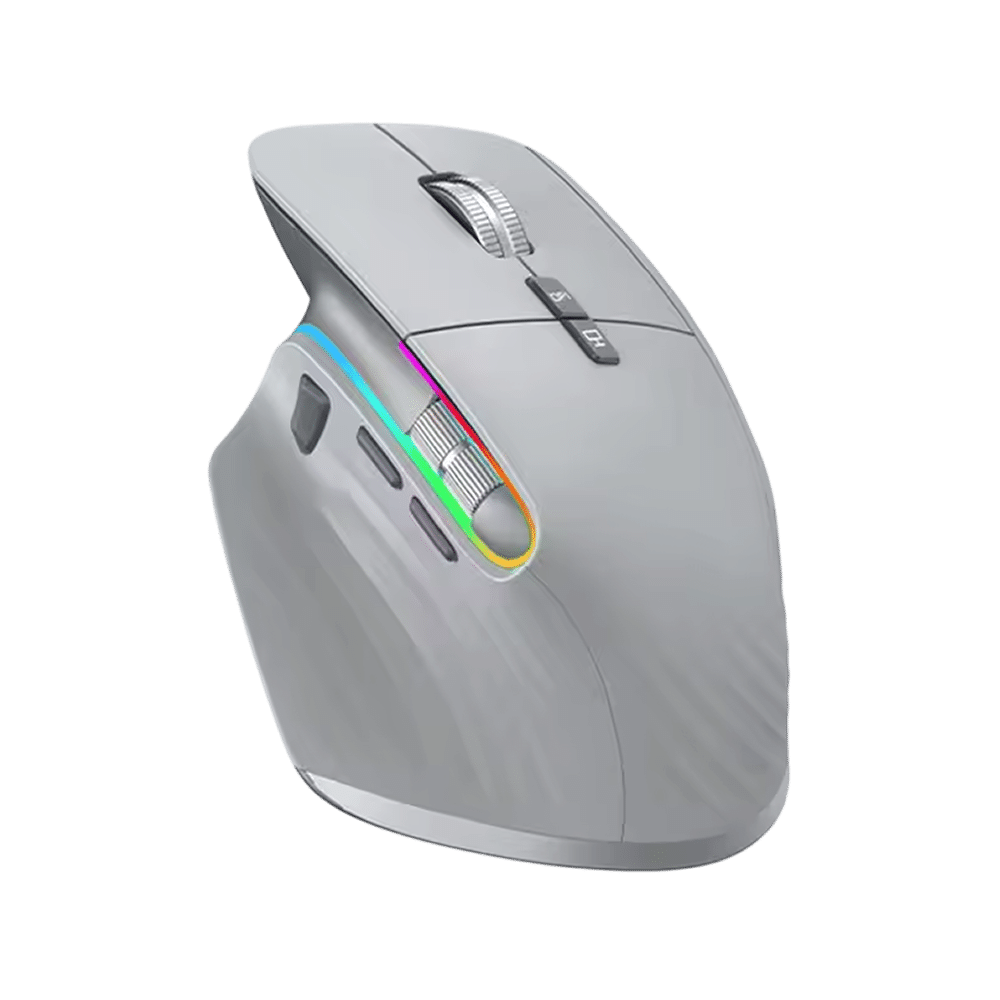
If the table points you to a handshake grip, VertiPalm is a vertical ergonomic computer mouse built for that grip. Hold the vertical body the way you would shake hands and start clicking. The product page presents it for detailed design work and everyday navigation, and we offer it here as a handshake-grip option rather than as a competitive gaming pick.
It connects through a USB wireless receiver or Bluetooth 5.0, and it pairs with three devices over 2.4G wireless and Bluetooth, so you can switch between computers without re-pairing. It has five DPI levels from 400 to 2000 and 12 RGB lighting effects that show through the translucent shell. The lights can be turned off completely.
The microswitches are quiet-click, which suits shared rooms and late hours. It charges through a Type-C cable, and the box includes the mouse, the USB wireless receiver and the charging cable.
 In this guideVertiPalm$79.99View
Features to check besides shape
Shape comes first, but a few specs decide whether a mouse fits your games. Read the product page for each of them.
- Connection: look for a USB receiver, Bluetooth or both. A receiver suits a single gaming PC, and Bluetooth suits a setup with several computers.
- Optical sensor and DPI range: confirm the DPI steps cover the sensitivity you use.
- Polling rate: a higher listed polling rate is a spec aimed at competitive play, so check what the manual lists.
- Programmable buttons: count the side buttons within reach of your thumb and check whether software is needed to assign them.
- Weight: compare the listed weight against your current mouse, especially for fingertip and claw grips.
- Switches: quiet-click switches suit late-night play, while standard switches have a louder click.
Wired or wireless
A wired gaming mouse needs a cable on the desk and no charging. A wireless mouse removes the cable but needs a charge, so look at the charging method and whether the receiver sits within reach of the mouse. For play, a USB receiver connection is the usual pick, while Bluetooth is handy for pairing with a laptop or tablet.
You can browse more options in our Keyboards & Mice collection.
Field note
Before buying, trace the outline of your current mouse on paper and lay it next to the dimensions of the new one. If the length differs a lot from the mouse you already use well, allow practice time.
Common mistakes when choosing an ergonomic gaming mouse
Check your plan against this list before you order.
- Choosing by looks instead of grip type.
- Skipping the hand measurement and guessing a size.
- Buying a long palm-grip body for a fingertip grip.
- Assuming a vertical mouse suits every game without practice.
- Ignoring desk height, mousepad size and chair position, which matter alongside the mouse.
Set your desk so your forearm sits level and your elbow stays near your side. Give the mouse a large cloth mousepad with room for wide swipes, then try the mouse in a casual game before ranked matches.
The rest of the desk deserves a look too. If you stream your matches, our guide to a high quality webcam covers what to check for a clearer picture.
Checklist before you order
- Name your grip.
- Measure hand length and width.
- Pick a shape from the shape table.
- Check connection, DPI range and button layout.
- Use the mouse in a casual game first, then decide.
With those steps done, picking a mouse gaming ergonomic fit rests on your own measurements rather than on a guess.